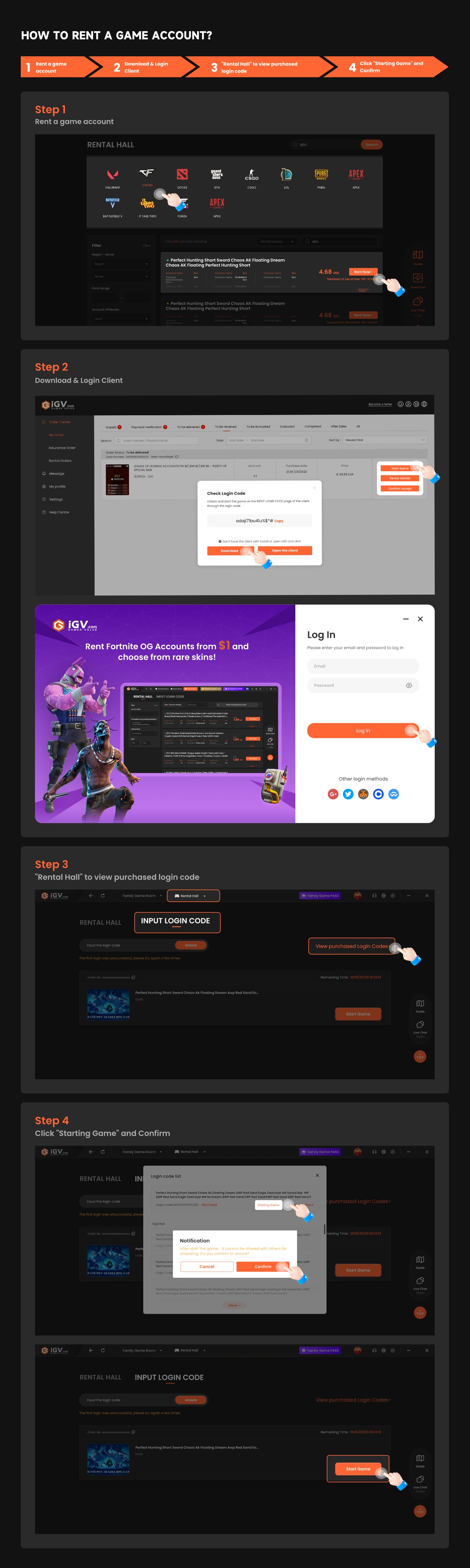

How to Rent a Game Account
Renting a game account on iGVault is simple once you know where to find your unlock code and how to launch the game correctly.
Step 1: Choose a rental listing and place your order
Select the game account rental you want and complete payment on iGVault.
Step 2: Download the required client or app
Some rentals require the iGVault client or a designated app to unlock and launch the game safely.
Step 3: Get your login or unlock code
After payment, go to your order page to view the login code or unlock code for that rental.
Step 4: Launch the game through the supported flow
Enter the code where required, then start the game according to the client or app instructions.
Step 5: Let the rental end normally
When the rental period ends, the system usually logs you out automatically. Follow any product-specific rules shown in the order.
Tip: If this is your first rental, watch the tutorial video linked below before you start.
Reference screenshots