

Answers to common questions about Family Game Pass and the Family Game Room client.
Can I share my Family Game Pass account with friends?
No. Your account is for personal use only. It can't be shared with others or used on several devices at the same time. To keep your account secure and follow the Terms of Service, don't share your login details with anyone.
Do I need to buy the Steam games separately?
No. With Family Game Pass, you can play the hundreds of Steam games in the library at no extra cost while your membership is active.
Do I need to install anything else?
Yes, you need the Steam client. When you log in to Family Game Room and choose a game, the client assigns you a Steam account automatically. Follow the on-screen instructions to download and install the game.
I get an error when I start a game
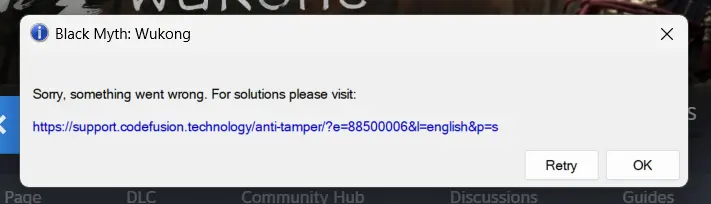
Example of an error when starting a game.
Try these steps in order:
- Temporarily turn off your antivirus software and firewall.
- Uninstall and reinstall the client.
- Restart the client and select Start Game again.
- If the error continues, try connecting through a different VPN. Some game publishers restrict IP addresses that have logged in to too many accounts.
Tip: For a smoother experience, install the client on a drive other than C:.
The game won't launch
Check the following:
- You downloaded the client version that matches your system (32-bit or 64-bit).
- Your computer meets the game's minimum requirements. If it doesn't, the game may not launch. This isn't a problem with the client.
If neither applies, try the steps in the previous question.
I get a virus warning when I download the client
Add the client folder as an exclusion in Windows Security:
- Open Windows Security and select Virus & threat protection.
- Under Virus & threat protection settings, select Manage settings.
- Under Exclusions, select Add or remove exclusions, then add the client folder.
Why do I get a different Steam account each time I log in?
That's normal. The client assigns Steam accounts at random, so the account may change each time.
Can I import save files from other sources?
No. Cloud saves only work with saves created in the Family Game Room client, and the download and delete options are for managing those saves. See How to use cloud saves in Family Game Room.